Micro RoadPilot. GPS Warning System.
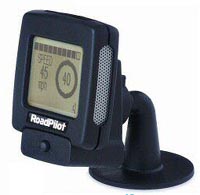
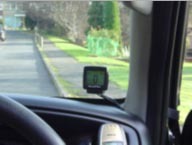
Above: The micro RoadPilot on its mount
This is a brilliant little gadget that is great if you are looking for something slightly more discreet to sit on your windscreen. It is less than 5 centimetres in height and width and sits on it's own cradle on the windscreen or dashboard and I can honestly say that I would not be without it.
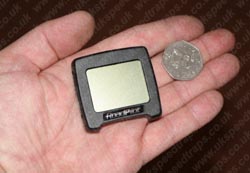
Above. Slightly more discreet than your average GPS system.
It is very well packaged and comes with a free six-month database subscription.
There is what seems to be some quite complicated wiring which can be daunting but providing you give yourself a good half an hour and make sure that you read through the instructions it is relatively straightforward to install. Alternatively you may choose to have your Micro professionally installed. A list of qualified installers is available from the RoadPilot website or by calling RoadPilot direct where they will be able to advise you of your closest outlet.
The unit has a single button operation, which you press quickly to move through the menu and then hold to select the option that you want. The settings are easy to adjust to your own preference and there are a number of features, which allow you to set the Micro exactly to your own specifications.
I would not say that the unit was completely portable in that transferring it between vehicles would mean that you would need to purchase additional cradles as these are permanently mounted by sticky pads to the windscreen or dashboard. However, extra cradles are available either from RoadPilot direct or via their website.
|
There is a 300mm length of the wire from the main unit to the easy to use system of plugs, which connects all of the separate components together.
You may find that you require additional extension cables in order to hide the bulk of wiring from view. These are also available as an accessory again either by calling RoadPilot direct or via their website.
|
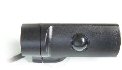
| The new LaserPilot now comes free with the Micro. This new version is much better and I have this installed discreetly in front of my rear view mirror. |
|
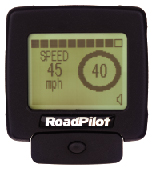 Camera Warning Screen.
Your speed, Speed limit and proximity to camera. |
The camera alert is fantastic and I cannot fault it. The alarm only goes off when you are approaching a speed camera and as you can see will also give you the speed limit of the road. You know exactly what you need to reduce your speed to in order to ensure that the police do not get a Polaroid of your vehicle. Your vehicle speed is indicated on the left and the speed limit on the right. The bar at the top of the display indicates your distance from the camera. Apart from the temporary cameras on motorway roadwork's (which are moved almost daily it seems) and one or two very new cameras it has not missed one yet. However, I don't synchronise my unit as often as I should for the amount of miles I do so maybe it wouldn't miss any. |
If you should pass a camera that is not on your database you just press and hold the button on the cradle and this will be stored for future trips.
All new camera's entered onto your Micro will be uploaded to the RoadPilot database the next time you synchronise your unit. RoadPilot offer a unique feature by offering a £20 discount off your next 6-month subscription if you are the first subscriber to inform them of a new camera when synchronising.
Certain roads have variable speed limits set like the stretch of M25 around Heathrow. Due to the variable speed limit in place here the unit has been stored with a speed limit of 30mph to ensure that the frequent changes don't catch you out. Combined with the roadwork's currently being carried out on the M25 you are alerted pretty much all the way around this stretch of road. However, by just a quick press on the single button at the bottom of the cradle you can mute the unit until you have passed each camera. It will remember to switch itself back on again for the next one just in case you are likely to forget. There are 43 gantries along this stretch of the M25 alerting you to speed cameras by markings in the road but only 9 of these actually have cameras installed. The Micro is programmed to only alert you when there is actually a speed camera present so you no longer have to stamp on the brakes every time you reach another gantry |
|
|
|
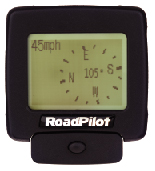
Compass
(Fantastic when following
directions from AutoRoute)
|
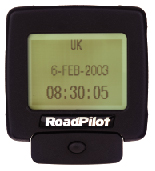
Date & Time |
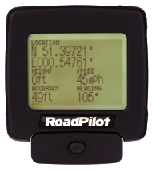
GPS Info |
|
|
|
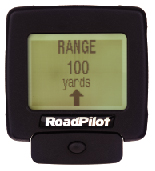
Range
(Distance to next Camera
as the crow flies)
|
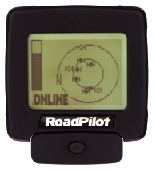
Satellites |
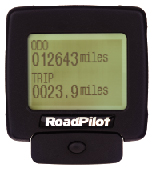
Trip Computer |
I like all of the additional features of the Micro but the one I use the most is the trip computer. If like me you have one of those fuel tanks that is sporadic when indicating your remaining petrol you may do the same as me and judge it by the miles you have completed since your last re-fuel. I now use the trip computer when on a business trip to enable me to record the exact mileage completed. Leaving the cars trip computer to show me when I need to make a re-fuelling stop.
Software
The Micro comes with software to use on your PC enabling synchronisation and database updates through the Internet. I did have some problems with this due to the fact that my antiquated PC still runs on Windows 98 but after speaking with a very good and patient member of the technical support team this was corrected following receipt of an email with new registry settings. Once installed, you connect your Micro to your PC using a separate cradle received in the box. Your PC will recognise your Micro automatically and begin to update your system. Simple!
Overall
As I said before, I really like this device, in fact I would probably go as far as to say I love it. It is small, compact, discreet, easy to remove if you are parking in a dodgy area, has bags of features and I honestly would not be without it. I drive many miles each day for work and for business users particularly I would say that the Micro RoadPilot is a must.
But I suppose the simple answer to the question of "would I buy one?" is:
"Absolutely!"
Grant Jones, Wilmington, Kent
March 2005
|